How to Fix 'DATABASE_URL Not Found' on Fly.io
While trying to deploy a Next.js site to Fly.io with Prisma.js and Postgres, I encountered an error that prevented deployment.
#12 3.531 error: Environment variable not found: DATABASE_URL.
#12 3.531   -->  schema.prisma:10
#12 3.531    |
#12 3.531  9 |     provider = "postgresql"
#12 3.531 10 |     url      = env("DATABASE_URL")
My Dockerfile was crashing on these lines:
RUN npx prisma migrate deploy
RUN npx prisma generate
It did work if I hard-coded the DATABASE_URL in the Dockerfile like this, but it isn’t safe to store secrets in Git:
ENV DATABASE_URL postgres:://...

RUN npx prisma migrate deploy
RUN npx prisma generate
I could see that the DATABASE_URL was correctly added to the Fly.io dashboard:
fly secrets listI could log in over SSH and see that the DATABASE_URL was on the production server:
fly ssh console
echo $DATABASE_URL
Fly.io Build Secrets
It turned out that the secrets aren’t available in the builder image, so the first Docker image (builder) couldn’t see the DATABASE_URL.
Someone pointed me in the direction of the build secrets docs, but it took me a bit of time to figure out how they worked. I thought it might save a few people a little time if I post my working solution here.
First, I created a file located at secrets/postgres_connection_string at the root of my project and added the secrets/ directory to my .gitignore and .dockerignore files. I put the plain database connection string in that file, without anything else.
Then in the Dockerfile:
RUN --mount=type=secret,id=db_secret \
DATABASE_URL="$(cat /run/secrets/db_secret)" \
npx prisma migrate deploy \
&& npx prisma generateThe id in that command creates a new secret named db_secret that will be passed in via the fly deploy command. It automatically gets stored in /run/secrets/db_secret in the builder image, which gets loaded into an environment variable named DATABASE_URL, which is available to the prisma commands that follow it.
Lines 2, 3, and 4 there are running a normal shell command with <some_value> being read out of a file that Fly creates in /run/secrets/:
DATABASE_URL=<some_value> npx prisma migrate deploy && npx prisma generateThe final step was to update my deploy command to load the db_secret from the new file located at secrets/postgres_connection_string:
fly deploy --build-secret db_secret=$(cat ./secrets/postgres_connection_string)To try to make it clearer, I’ve color coded the relationships in the image below.
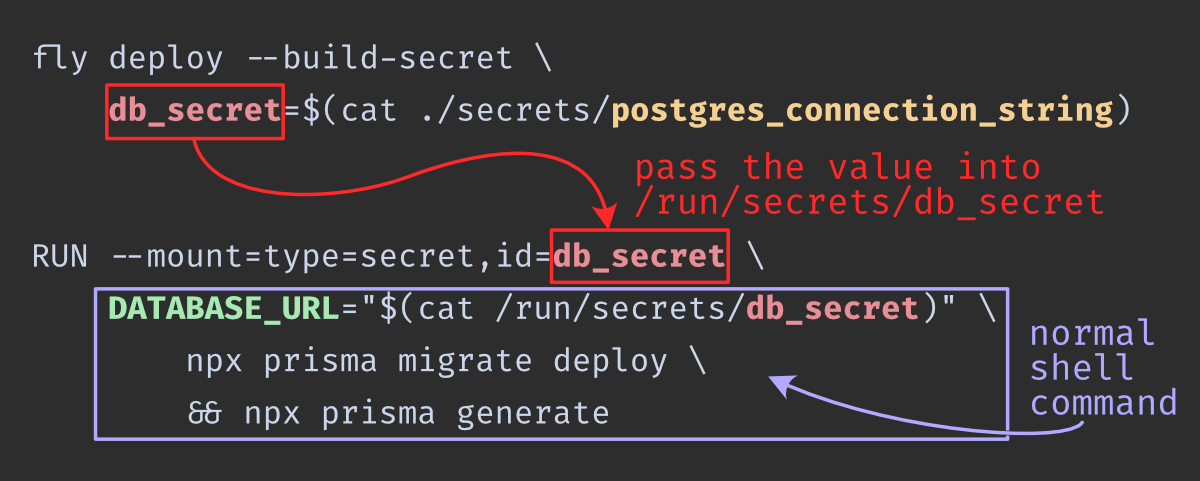
postgres_connection_string– this filename is arbitrary. Thecatcommand just outputs the contents of the file.- The first two usages of
db_secretin that image case Fly.io to create a file at/run/secrets/db_secretin the builder image. The third time it’s used, it’s being loaded as an environment variable namedDATABASE_URLinto a regular shell command. Prisma is going to look for a variable namedDATABASE_URL, so it has to have that name. You can change the name ofdb_secretto something else as long as the name is the same in those three places.
Here’s the full Dockerfile for reference:
# Install dependencies only when needed
FROM node:16-alpine AS builder
RUN apk add --no-cache libc6-compat
WORKDIR /app
COPY . .
RUN yarn install --frozen-lockfile
ENV NEXT_TELEMETRY_DISABLED 1
# Add `ARG` instructions below if you need `NEXT_PUBLIC_` variables
# then put the value on your fly.toml
# Example:
# ARG NEXT_PUBLIC_EXAMPLE="value here"
RUN --mount=type=secret,id=db_secret \
    DATABASE_URL="$(cat /run/secrets/db_secret)" \
        npx prisma migrate deploy \
        && npx prisma generate
RUN yarn build
# Production image, copy all the files and run next
FROM node:16-alpine AS runner
WORKDIR /app
ENV NODE_ENV production
ENV NEXT_TELEMETRY_DISABLED 1
RUN addgroup --system --gid 1001 nodejs
RUN adduser --system --uid 1001 nextjs
COPY --from=builder /app ./
USER nextjs
CMD ["yarn", "start"]